Creating an account on AdTaskPro is quick, simple, and secure. Whether you are joining as an earner or exploring opportunities on our platform, this detailed guide will walk you through the entire registration process step by step.
In this article, you will learn:
Why you should create an account
Step-by-step registration instructions
How email verification works
How to avoid common registration mistakes
Frequently asked questions
Account security tips
If you are new to AdTaskPro, this guide will help you get started confidently.
Why Create an Account on AdTaskPro?
Before registering, it’s important to understand the benefits of creating an account.
When you register on AdTaskPro, you can:
Access your personalized dashboard
Track your tasks and progress
Earn rewards by completing activities
Invite friends using your referral code
Securely manage your profile and earnings
Your account gives you full control over your activity and allows you to participate in all available features on the platform.
Step-by-Step Guide to Register an Account
Follow these simple steps to successfully create your account.
Step 1: Visit the Registration Page
Go to the official AdTaskPro registration page. Make sure you are on the correct website to avoid phishing or fake pages.
Always check:
The website URL
Secure HTTPS connection
Official branding
Security is very important when creating an online account.
Step 2: Choose Your Role
On the registration page, you will see an option for selecting your role. By default, the role is set to:
Earner
This means you will be joining to complete tasks and earn rewards.
If the platform offers multiple roles, make sure you select the correct one before proceeding.
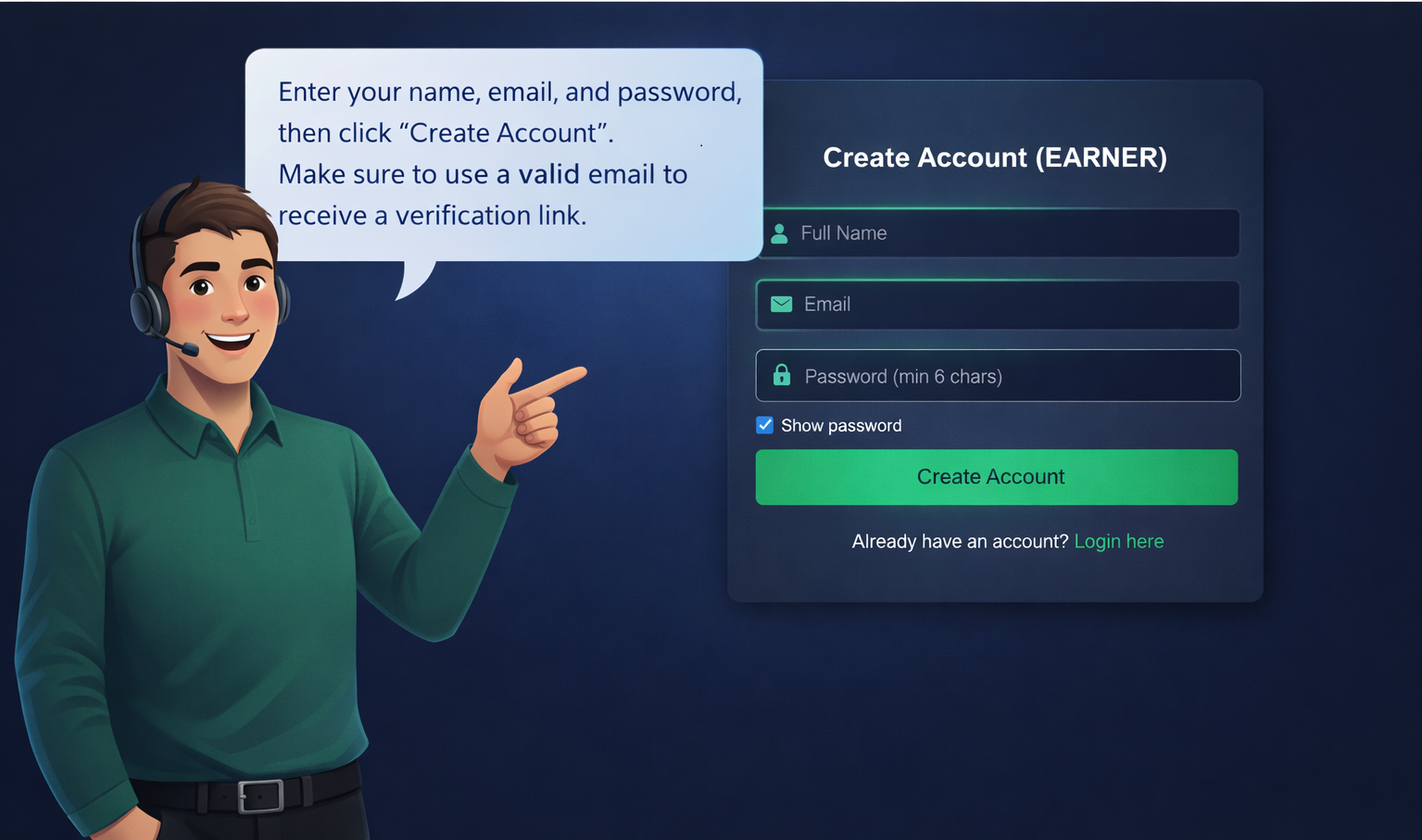
Step 3: Enter Your Full Name
In the “Full Name” field:
Enter your real name
Avoid using symbols or fake names
Make sure spelling is correct
Using your real name helps maintain account authenticity and avoids issues during future verification.
Step 4: Enter a Valid Email Address
Your email address is very important because:
It will be used for login
You will receive verification email
You may receive important notifications
Tips for entering your email:
Double-check spelling
Do not use temporary email addresses
Make sure you have access to the inbox
Example of valid email format:
example@gmail.com
If you enter an invalid email format, the system will show:
“Invalid email address”
Step 5: Create a Strong Password
Your password must be:
At least 6 characters long
Easy for you to remember
Hard for others to guess
For better security, use:
Uppercase letters
Lowercase letters
Numbers
Special characters
Example of strong password:
AdTask@2025
Avoid using:
123456
password
your name
your birthdate
The system will show an error if your password is less than 6 characters.
Step 6: Use the Show Password Option (Optional)
You will see a checkbox labeled:
Show password
If you click it, your password will become visible. This helps you:
Confirm correct typing
Avoid typing mistakes
This feature works similar to Google’s password visibility option.
Step 7: Click “Create Account”
After filling all fields:
Full Name
Email
Password
Click the Create Account button.
The system will now:
Check if the email already exists
Validate your information
Create your account securely
What Happens After You Register?
After clicking Create Account, one of the following will happen:
1. If Email Already Exists
You will see:
“Email already registered”
In this case, you should:
Go to login page
Use forgot password option if needed
2. If Registration Is Successful
You will see a message:
“Account created successfully! Please check your email to verify your account.”
This means your account is created but not yet activated.
Email Verification Process
For security reasons, AdTaskPro uses email verification.
This prevents:
Fake registrations
Spam accounts
Unauthorized access
How Email Verification Works
After registration, a verification email is sent to your inbox.
Open your email.
Find the message from AdTaskPro.
Click the verification link inside the email.
Your account will be activated.
If you do not verify your email:
You cannot log in
You cannot access the dashboard
You cannot use platform features
Didn’t Receive Verification Email?
If you don’t see the email:
Check Spam folder
Check Promotions tab (Gmail users)
Wait 2–5 minutes
Make sure you entered correct email
If still not received, contact support.
Logging In After Verification
Once your email is verified:
Go to Login page
Enter your registered email
Enter your password
Click Login
If your account is not verified, login will be blocked for security reasons.
Understanding Referral Code System
AdTaskPro also supports referral registration.
If someone invited you:
They may provide a referral link
The system automatically detects referral code
Your account will be linked to inviter
Benefits of referral system:
Earn bonuses
Grow network
Track invited users
If no referral code is provided, registration still works normally.
Common Registration Errors and Solutions
Here are common problems users face:
Error: Invalid Email Address
Solution:
Check spelling
Use proper format (example@gmail.com
)
Error: Password Must Be at Least 6 Characters
Solution:
Use longer password
Avoid short simple words
Error: Email Already Registered
Solution:
Login instead
Reset password if forgotten
Account Security Tips
To keep your account secure:
Never share your password
Do not use same password on multiple websites
Log out from public computers
Enable email security (2FA if available)
Avoid clicking suspicious links
Security is your responsibility as well.
Why Email Verification Is Important
Email verification helps:
Protect your account
Prevent fraud
Ensure real users only
Improve platform safety
Most professional platforms including Google, Facebook, and banking apps use email verification.
AdTaskPro follows modern security practices to protect users.
Benefits of Having a Verified Account
Once verified, you can:
Access full dashboard
Start completing tasks
Track earnings
Withdraw rewards (if available)
Use referral system
Receive important updates
Verification unlocks full functionality.
Frequently Asked Questions (FAQs)
Is registration free?
Yes, creating an account is completely free.
Can I register multiple accounts?
No, multiple accounts may violate platform rules.
Can I change my email later?
Depending on platform policy, email change may require verification.
What if I forget my password?
Use the “Forgot Password” option on login page.
How long does verification email take?
Usually within 1–5 minutes.
Final Words
Registering on AdTaskPro is simple, secure, and fast. By following the steps in this guide, you can create your account without any issues.
To summarize:
Enter your real name
Use a valid email
Create strong password
Verify your email
Login and start using your account
Your journey begins with a simple registration step.
Create your account today and explore the opportunities waiting for you on AdTaskPro.
How to Register an Account on AdTaskPro – Complete Step-by-Step Guide
← Back to Blog
Comments (0)
Leave Comment